
What Are Your Employees Actually Doing? (The Security Data Microsoft 365 Hides in Plain Sight)
Your Microsoft 365 environment holds months of employee security behavior data you have never seen. Employee Pulse surfaces it in 15 minutes — no setup meetings required.
It is Thursday afternoon. You have been asked to present employee security metrics at next week’s leadership meeting. You open the Microsoft 365 admin center. Then the Entra ID portal. Then Defender. You start pulling data, copying numbers into a spreadsheet, trying to make sense of what you are looking at.
Three hours later, you have a handful of numbers that describe activity — login counts, MFA enrollment percentages, maybe some Defender alerts. None of it answers the question your CFO is actually going to ask: are our people behaving more securely than they were six months ago?
You do not know. Right now, you have no way to find out.
If this sounds familiar, you are not alone — and you are not doing anything wrong. The data you need exists inside your Microsoft 365 environment right now. The problem is that nobody has been showing it to you.
The Data Exists. The Visibility Does Not.
Here is what makes this so frustrating. Microsoft 365 captures an enormous amount of behavioral signal. How employees handle emails, whether they follow sharing policies, how they authenticate, what they forward externally, how they interact with sensitive data. The raw material for understanding human security behavior is already there, sitting across multiple admin portals.
Microsoft was not built to interpret that data for you. Each portal shows a slice. The admin center shows one thing. Entra ID shows another. Defender shows a third. None of them connects the dots into a coherent picture of how a specific employee, team, or department is actually behaving across all of those dimensions. You are the integration layer — and the integration method is a spreadsheet and a few hours you do not have.
If you are running a Security Awareness Training platform alongside Microsoft 365, you get yet another set of metrics — completion rates, phishing simulation click rates, quiz scores — that measure participation, not behavior. A 95% training completion rate tells you people clicked through the modules. It tells you nothing about whether they changed how they handle email, authenticate, or share data afterwards.
There is a fundamental gap here. You are being asked to manage human security risk in your organization, yet nobody has given you a way to actually see human security behavior. The industry has spent two decades selling training tools and calling the problem solved. Meanwhile, the security leaders responsible for results are stuck manually querying fragmented data sources and hoping the numbers add up to something meaningful.
That is not a fair ask. You should not be held accountable for something you cannot see.
Employee Pulse: Your Organization’s Security Heartbeat
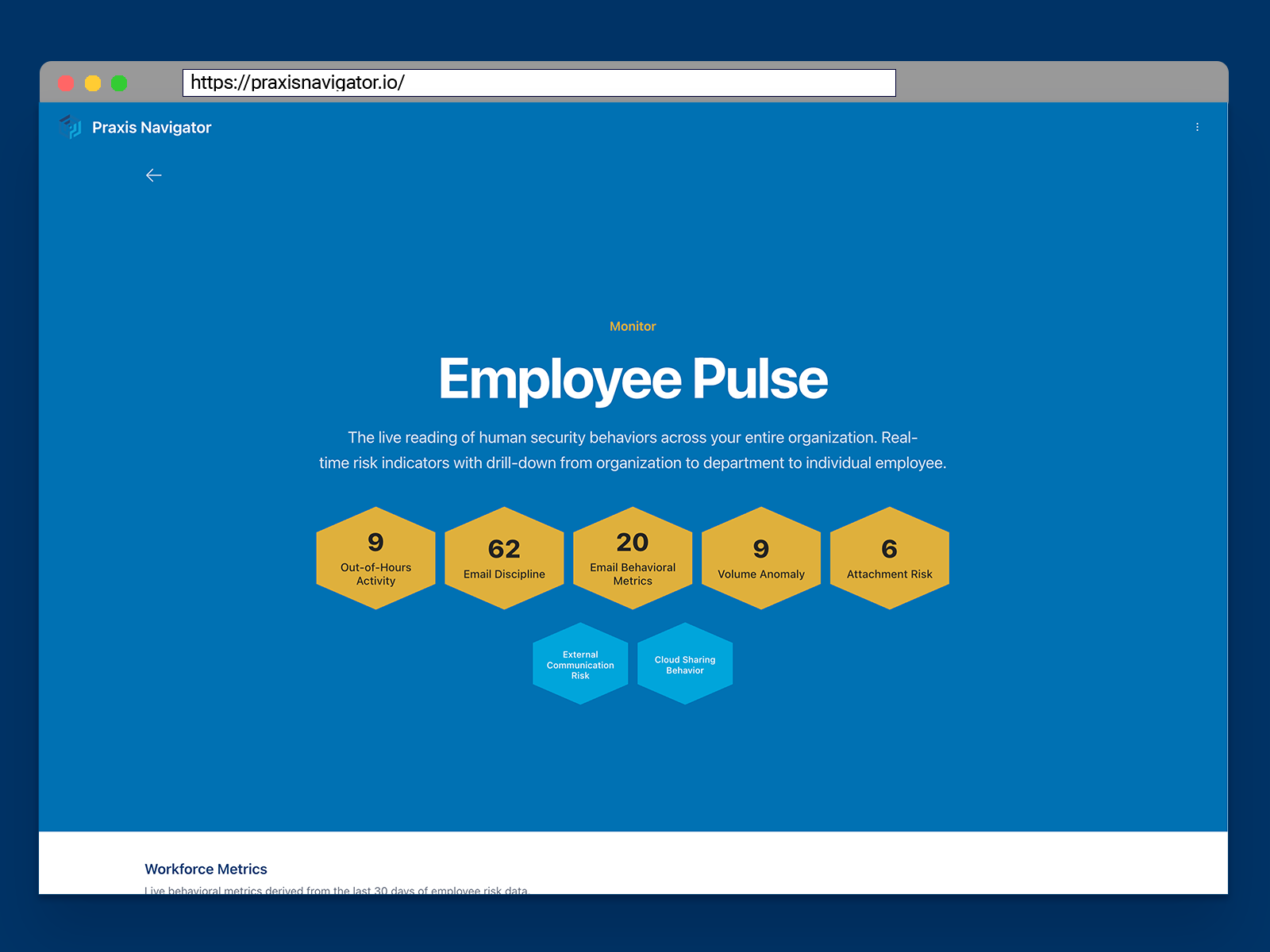
This is the problem Praxis Navigator Employee Pulse was built to solve. Employee Pulse is a consolidated view of human security behaviors across your entire organization — the live reading of what your people are actually doing, right now.
Instead of diving into three or four Microsoft portals and piecing together a picture manually, Employee Pulse pulls behavioral data from your Microsoft 365 environment and translates it into a single, readable dashboard. You can drill down from the organization level to department to individual employee. You can see patterns — who is forwarding emails externally, where MFA adoption is lagging, which departments have the highest risk indicators — without spending hours extracting the data yourself.
Here is the part that changes the equation: Employee Pulse does not start with an empty screen. When you connect your Microsoft 365 environment, Praxis Navigator immediately accesses your existing historic data. Within 15 minutes of setup, you are looking at months of behavioral patterns you have never seen before — populated from your own data, not a sample dashboard or a vendor demo.
There is no procurement process, no implementation project, no integration meetings. You authorize the connection through the Microsoft Marketplace, the self-service wizard runs, and 15 minutes later you are looking at your organization’s security heartbeat for the first time.
What This Looks Like in Practice
Consider a logistics company with 200 employees across three offices. Their IT director — let us call her Sarah — manages a small team of three and reports to the COO. She knows human security is a growing concern, yet between infrastructure projects, an ongoing ERP migration, and day-to-day support tickets, security behavior monitoring has always been something she will “get to eventually.”
Sarah connects Praxis Navigator on a Monday morning. By 10am, she is looking at her Employee Pulse dashboard. She can see that the warehouse operations team has been consistently forwarding internal documents to personal email accounts — a pattern that has been going on for months, invisible until now. She can see that the finance department has the strongest authentication practices in the company, while the sales team has the weakest. She can see that one specific user has triggered multiple risk indicators across different behavior categories over the past quarter.
None of this was hidden. It was all sitting in Microsoft 365. Without Employee Pulse consolidating and interpreting the data, Sarah would have needed days of manual querying across multiple portals to uncover what she is now seeing in a single view. She would have needed to repeat that effort every time someone asked her for an update.
The difference is not access to data — it is having a tool that translates fragmented signals into something meaningful. Employee Pulse takes what Microsoft 365 captures and turns it into the behavioral intelligence a security leader actually needs: clear, organized, and updated continuously without Sarah touching anything.
The Question Behind the Question
When your CFO asks “are we secure?”, they are not really asking about firewall configurations or patch management cycles. They are asking whether the people in the organization — the humans making decisions every day about what to click, what to forward, what to share — are behaving in ways that protect the business.
That is a question about behavior. Until now, most security leaders have not had a tool that answers it. They have had tools that measure training activity and tools that measure technical controls — yet nothing in between. Nothing that looks at the people themselves and tells you how they are actually operating day to day.
Employee Pulse does not replace your existing security stack. It does not compete with your SAT platform or your endpoint protection. It sits alongside them and answers the question they cannot: what are your people actually doing? Think of it as the measurement layer that has been missing from the human side of your security program.
From Pulse to Proof: The Bigger Picture
Seeing what is happening right now is the essential first step. It is only the beginning.
Once you can see current behaviors, the next question is obvious: are things getting better or worse? That is where Risk Bearing comes in — building rolling internal baselines so you can track your actual direction of travel over time, rather than comparing yourself against meaningless industry benchmarks.
Once you can see and track behaviors, you need to communicate them to stakeholders who do not speak the same technical language — which is exactly what Stakeholder Brief automates for you.
Each capability builds on the previous one. Employee Pulse is the foundation: the live reading that makes everything else possible.
Your Data Has Been Waiting
Here is the part that creates genuine urgency, and it is not a marketing deadline — it is a technical reality. Microsoft retains behavioral data for 180 days on most licenses — up to 1 year for some data on E5. Every week that passes is a week of behavioral history that ages out of your environment permanently.
A customer who connects Praxis Navigator today captures a richer historic baseline than one who connects in three months. That data is sitting in your Microsoft 365 environment right now, and it will not be there forever.
Ready to see your employees' security behaviors?
Connect your Microsoft 365 and see months of behavioral data in 15 minutes. Free 30-day trial — no credit card, no sales call.
Start Free Trial